Google Tag Manager

2013/02/26

Get SVG from PathIterator

Code

private StringBuilder makeStarburstSvg(PathIterator pi, int sz, String style, String desc) {
  StringBuilder sb = new StringBuilder();
  sb.append("<?xml version=\"1.0\" encoding=\"UTF-8\"?>\n");
  //...
  sb.append(String.format("<svg width=\"%d\" height=\"%d\" xmlns=\"%s\">%n", sz, sz, w3));
  sb.append(String.format("  <desc>%s</desc>%n", desc));
  sb.append("  <path d=\"");
  double[] c = new double[6];
  while(!pi.isDone()) {
    switch(pi.currentSegment(c)) {
      case PathIterator.SEG_MOVETO:
        sb.append(String.format("M%.2f,%.2f ", c[0], c[1])); break;
      case PathIterator.SEG_LINETO:
        sb.append(String.format("L%.2f,%.2f ", c[0], c[1])); break;
      case PathIterator.SEG_QUADTO:
        sb.append(String.format("Q%.2f,%.2f,%.2f,%.2f ",c[0],c[1],c[2],c[3]));
        break;
      case PathIterator.SEG_CUBICTO:
        sb.append(String.format("C%.2f,%.2f,%.2f,%.2f,%.2f,%.2f ",c[0],c[1],c[2],c[3],c[4],c[5]));
        break;
      case PathIterator.SEG_CLOSE:
        sb.append("Z"); break;
    }
    pi.next();
  }
  sb.append(String.format("\" style=\"%s\" />%n</svg>%n", style));
  return sb;
}

References

2013/01/28

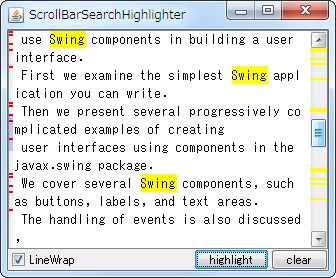
JScrollBar search highlighter

Code

Override WindowsScrollBarUI#paintTrack(...)

scrollbar.setUI(new WindowsScrollBarUI() {
  @Override protected void paintTrack(
      Graphics g, JComponent c, Rectangle trackBounds) {
    super.paintTrack(g, c, trackBounds);

    Rectangle rect = textArea.getBounds();
    double sy = trackBounds.getHeight() / rect.getHeight();
    AffineTransform at = AffineTransform.getScaleInstance(1.0, sy);
    Highlighter highlighter = textArea.getHighlighter();
    g.setColor(Color.YELLOW);
    try {
      for (Highlighter.Highlight hh : highlighter.getHighlights()) {
        Rectangle r = textArea.modelToView(hh.getStartOffset());
        Rectangle s = at.createTransformedShape(r).getBounds();
        int h = 2; // Math.max(2, s.height - 2);
        g.fillRect(trackBounds.x, trackBounds.y + s.y, trackBounds.width, h);
      }
    }catch (BadLocationException ex) {
      ex.printStackTrace();
    }
  }
});

JLabel + Icon + RowHeader

Code

final JScrollPane scroll = new JScrollPane(textArea);
JLabel label = new JLabel(new Icon() {
  private final Color THUMB_COLOR = new Color(0, 0, 255, 50);
  private final Rectangle thumbRect = new Rectangle();
  private final JTextComponent textArea;
  private final JScrollBar scrollbar;

  public HighlightIcon(JTextComponent textArea, JScrollBar scrollbar) {
    this.textArea = textArea;
    this.scrollbar = scrollbar;
  }

  @Override public void paintIcon(Component c, Graphics g, int x, int y) {
    // Rectangle rect   = textArea.getBounds();
    // Dimension sbSize = scrollbar.getSize();
    // Insets sbInsets  = scrollbar.getInsets();
    // double sy = (sbSize.height - sbInsets.top - sbInsets.bottom) / rect.getHeight();
    int itop = scrollbar.getInsets().top;
    BoundedRangeModel range = scrollbar.getModel();
    double sy = range.getExtent() / (double) (range.getMaximum() - range.getMinimum());
    AffineTransform at = AffineTransform.getScaleInstance(1.0, sy);
    Highlighter highlighter = textArea.getHighlighter();

    // paint Highlight
    g.setColor(Color.RED);
    try {
      for (Highlighter.Highlight hh: highlighter.getHighlights()) {
        Rectangle r = textArea.modelToView(hh.getStartOffset());
        Rectangle s = at.createTransformedShape(r).getBounds();
        int h = 2; // Math.max(2, s.height - 2);
        g.fillRect(x, y + itop + s.y, getIconWidth(), h);
      }
    } catch (BadLocationException e) {
      e.printStackTrace();
    }

    // paint Thumb
    if (scrollbar.isVisible()) {
      // JViewport vport = Objects.requireNonNull(
      //   (JViewport) SwingUtilities.getAncestorOfClass(JViewport.class, textArea));
      // Rectangle thumbRect = vport.getBounds();
      thumbRect.height = range.getExtent();
      thumbRect.y = range.getValue(); // vport.getViewPosition().y;
      g.setColor(THUMB_COLOR);
      Rectangle s = at.createTransformedShape(thumbRect).getBounds();
      g.fillRect(x, y + itop + s.y, getIconWidth(), s.height);
    }
  }

  @Override public int getIconWidth() {
    return 8;
  }

  @Override public int getIconHeight() {
    JViewport vport = Objects.requireNonNull(
      (JViewport) SwingUtilities.getAncestorOfClass(JViewport.class, textArea));
    return vport.getHeight();
  }
});

scroll.setVerticalScrollBar(scrollbar);
/*
// Fixed Versions: 7 (b134)
scroll.setRowHeaderView(label);
/*/
// 6826074 JScrollPane does not revalidate the component hierarchy after scrolling
// https://bugs.openjdk.org/browse/JDK-6826074
// Affected Versions: 6u12,6u16,7
JViewport vp = new JViewport() {
  @Override public void setViewPosition(Point p) {
    super.setViewPosition(p);
    revalidate();
  }
};
vp.setView(label);
scroll.setRowHeader(vp);

MatteBorder + Icon + RowHeader

Code

JScrollBar scrollBar = new JScrollBar(Adjustable.VERTICAL) {
  @Override public Dimension getPreferredSize() {
    Dimension d = super.getPreferredSize();
    d.width += getInsets().left;
    return d;
  }

  @Override public void updateUI() {
    super.updateUI();
    setBorder(BorderFactory.createMatteBorder(0, 4, 0, 0, new Icon() {
      @Override public void paintIcon(Component c, Graphics g, int x, int y) {
        // ...
      }

      @Override public int getIconWidth() {
        return getInsets().left;
      }

      @Override public int getIconHeight() {
        return getHeight();
      }
    }));
  }
};
scroll.setVerticalScrollBar(scrollBar);

References

2013/01/08

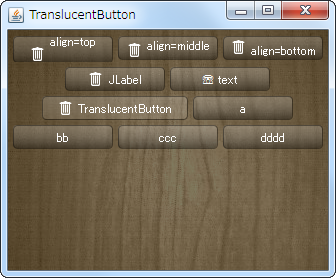
make a translucent JButton

Code

class TranslucentButton extends JButton {
  private static final Color TL = new Color(1f, 1f, 1f, .2f);
  private static final Color BR = new Color(0f, 0f, 0f, .4f);
  private static final Color ST = new Color(1f, 1f, 1f, .2f);
  private static final Color SB = new Color(1f, 1f, 1f, .1f);
  private Color ssc;
  private Color bgc;
  private int r = 8;

  public TranslucentButton(String text) {
    super(text);
  }

  public TranslucentButton(String text, Icon icon) {
    super(text, icon);
  }

  @Override public void updateUI() {
    super.updateUI();
    setContentAreaFilled(false);
    setFocusPainted(false);
    setOpaque(false);
    setForeground(Color.WHITE);
  }

  @Override protected void paintComponent(Graphics g) {
    int x = 0;
    int y = 0;
    int w = getWidth();
    int h = getHeight();
    Graphics2D g2 = (Graphics2D) g.create();
    g2.setRenderingHint(
      RenderingHints.KEY_ANTIALIASING,
      RenderingHints.VALUE_ANTIALIAS_ON);
    Shape area = new RoundRectangle2D.Float(x, y, w - 1, h - 1, r, r);
    ssc = TL;
    bgc = BR;
    ButtonModel m = getModel();
    if (m.isPressed()) {
      ssc = SB;
      bgc = ST;
    } else if (m.isRollover()) {
      ssc = ST;
      bgc = SB;
    }
    g2.setPaint(new GradientPaint(x, y, ssc, x, y + h, bgc, true));
    g2.fill(area);
    g2.setPaint(BR);
    g2.draw(area);
    g2.dispose();
    super.paintComponent(g);
  }
}

// ...
private static String makeTitleWithIcon(URL u, String t, String a) {
  return String.format(
    "<html><p align='%s'><img src='%s' align='%s' />&nbsp;%s", a, u, a, t);
}

private static AbstractButton makeButton(String title) {
  return new JButton(title) {
    @Override public void updateUI() {
      super.updateUI();
      setVerticalAlignment(SwingConstants.CENTER);
      setVerticalTextPosition(SwingConstants.CENTER);
      setHorizontalAlignment(SwingConstants.CENTER);
      setHorizontalTextPosition(SwingConstants.CENTER);
      setMargin(new Insets(2, 8, 2, 8));
      setBorder(BorderFactory.createEmptyBorder(2, 8, 2, 8));
      // setBorderPainted(false);
      setContentAreaFilled(false);
      setFocusPainted(false);
      setOpaque(false);
      setForeground(Color.WHITE);
      setIcon(new TranslucentButtonIcon());
    }
  };
}

References

2012/12/09

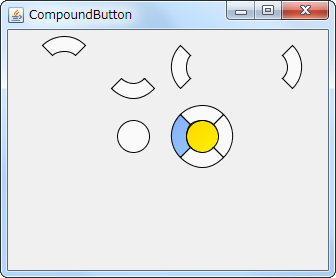
Combine five JButtons to make CompoundButton

Code

private static JComponent makeCompoundButton(final Dimension d) {
  JPanel p = new JPanel() {
    @Override public Dimension getPreferredSize() {
      return d;
    }
  };
  p.setLayout(new OverlayLayout(p));
  p.add(new CompoundButton(d, ButtonLocation.NORTH));
  p.add(new CompoundButton(d, ButtonLocation.SOUTH));
  p.add(new CompoundButton(d, ButtonLocation.EAST));
  p.add(new CompoundButton(d, ButtonLocation.WEST));
  p.add(new CompoundButton(d, ButtonLocation.CENTER));
  return p;
}

class CompoundButton extends JButton {
  protected final Color fc = new Color(100, 150, 255, 200);
  protected final Color ac = new Color(230, 230, 230);
  protected final Color rc = Color.ORANGE;
  protected Shape shape;
  protected Shape base = null;
  private final ButtonLocation bl;
  private final Dimension dim;
  public CompoundButton(Dimension d, ButtonLocation bl) {
    super();
    this.dim = d;
    this.bl = bl;
    setIcon(new Icon() {
      @Override public void paintIcon(Component c, Graphics g, int x, int y) {
        Graphics2D g2 = (Graphics2D) g.create();
        g2.setRenderingHint(RenderingHints.KEY_ANTIALIASING,
                            RenderingHints.VALUE_ANTIALIAS_ON);
        if (getModel().isArmed()) {
          g2.setColor(ac);
          g2.fill(shape);
        } else if (isRolloverEnabled() && getModel().isRollover()) {
          paintFocusAndRollover(g2, rc);
        } else if (hasFocus()) {
          paintFocusAndRollover(g2, fc);
        } else {
          g2.setColor(getBackground());
          g2.fill(shape);
        }
        g2.dispose();
      }

      @Override public int getIconWidth()  {
        return dim.width;
      }

      @Override public int getIconHeight() {
        return dim.height;
      }
    });
    setFocusPainted(false);
    setContentAreaFilled(false);
    setBackground(new Color(250, 250, 250));
    initShape();
  }

  @Override public Dimension getPreferredSize() {
    return dim;
  }

  protected void initShape() {
    if (!getBounds().equals(base)) {
      base = getBounds();
      float ww = getWidth() * .5f;
      float xx = ww * .5f;
      Shape inner = new Ellipse2D.Float(xx, xx, ww, ww);
      if (ButtonLocation.CENTER == bl) {
        shape = inner;
      } else {
        Shape outer = new Arc2D.Float(
          1, 1, getWidth() - 2, getHeight() - 2,
          bl.getStartDegree(), 90f, Arc2D.PIE);
        Area area = new Area(outer);
        area.subtract(new Area(inner));
        shape = area;
      }
    }
  }

  private void paintFocusAndRollover(Graphics2D g2, Color color) {
    g2.setPaint(new GradientPaint(
        0, 0, color, getWidth() - 1, getHeight() - 1, color.brighter(), true));
    g2.fill(shape);
    g2.setColor(getBackground());
  }

  @Override protected void paintComponent(Graphics g) {
    initShape();
    super.paintComponent(g);
  }

  @Override protected void paintBorder(Graphics g) {
    Graphics2D g2 = (Graphics2D) g.create();
    g2.setRenderingHint(RenderingHints.KEY_ANTIALIASING,
                        RenderingHints.VALUE_ANTIALIAS_ON);
    g2.setColor(getForeground());
    g2.draw(shape);
    g2.dispose();
  }

  @Override public boolean contains(int x, int y) {
    // initShape();
    return shape.contains(x, y);
  }
}

References

2012/11/20

Make a ToggleButtonBar with JRadioButtons

Code

class ToggleButtonBarCellIcon implements Icon {
  private static final Color TL = new Color(1f, 1f, 1f, .2f);
  private static final Color BR = new Color(0f, 0f, 0f, .2f);
  private static final Color ST = new Color(1f, 1f, 1f, .4f);
  private static final Color SB = new Color(1f, 1f, 1f, .1f);
  private Color ssc;
  private Color bgc;

  @Override public void paintIcon(Component c, Graphics g, int x, int y) {
    int r = 8;
    int w = c.getWidth();
    int h = c.getHeight();

    Container parent = c.getParent();
    if (parent == null) {
      return;
    }

    Graphics2D g2 = (Graphics2D) g.create();
    g2.setRenderingHint(RenderingHints.KEY_ANTIALIASING,
                        RenderingHints.VALUE_ANTIALIAS_ON);
    Path2D p = new Path2D.Float();

    if (c == parent.getComponent(0)) {
      // JButton.segmentPosition: first
      // :first-child
      p.moveTo(x, y + r);
      p.quadTo(x, y, x + r, y);
      p.lineTo(x + w, y);
      p.lineTo(x + w, y + h);
      p.lineTo(x + r, y + h);
      p.quadTo(x, y + h, x, y + h - r);
    } else if (c == parent.getComponent(parent.getComponentCount() - 1)) {
      // JButton.segmentPosition: last
      // :last-child
      p.moveTo(x, y);
      p.lineTo(x + w - r, y);
      p.quadTo(x + w, y, x + w, y + r);
      p.lineTo(x + w, y + h - r);
      p.quadTo(x + w, y + h, x + w - r, y + h);
      p.lineTo(x, y + h);
    } else {
      // JButton.segmentPosition: middle
      p.moveTo(x, y);
      p.lineTo(x + w, y);
      p.lineTo(x + w, y + h);
      p.lineTo(x, y + h);
    }
    p.closePath();
    Area area = new Area(p);

    g2.setPaint(c.getBackground());
    g2.fill(area);

    ssc = TL;
    bgc = BR;
    if (c instanceof AbstractButton) {
      ButtonModel m = ((AbstractButton) c).getModel();
      if (m.isSelected() || m.isRollover()) {
        ssc = ST;
        bgc = SB;
      }
    }
    g2.setPaint(new GradientPaint(x, y, ssc, x, y + h, bgc, true));
    g2.fill(area);

    g2.setPaint(BR);
    g2.draw(area);

    g2.dispose();
  }

  @Override public int getIconWidth()  {
    return 80;
  }

  @Override public int getIconHeight() {
    return 20;
  }
}

References