Google Tag Manager

2020/06/30

Create a month calendar with diagonally split JTable cells

Code

class CalendarTableRenderer extends DefaultTableCellRenderer {
  private final JPanel p = new JPanel();

  @Override public Component getTableCellRendererComponent(
        JTable table, Object value, boolean selected, boolean focused,
        int row, int column) {
    JLabel c = (JLabel) super.getTableCellRendererComponent(
        table, value, selected, focused, row, column);
    if (value instanceof LocalDate) {
      LocalDate d = (LocalDate) value;
      c.setText(Objects.toString(d.getDayOfMonth()));
      c.setVerticalAlignment(SwingConstants.TOP);
      c.setHorizontalAlignment(SwingConstants.LEFT);
      updateCellWeekColor(d, c, c);

      LocalDate nextWeekDay = d.plusDays(7);
      boolean isLastRow = row == table.getModel().getRowCount() - 1;
      if (isLastRow &&
          YearMonth.from(nextWeekDay).equals(YearMonth.from(getCurrentLocalDate()))) {
        JLabel sub = new JLabel(Objects.toString(nextWeekDay.getDayOfMonth()));
        sub.setBorder(BorderFactory.createEmptyBorder(1, 1, 1, 1));
        sub.setOpaque(false);
        sub.setVerticalAlignment(SwingConstants.BOTTOM);
        sub.setHorizontalAlignment(SwingConstants.RIGHT);

        p.removeAll();
        p.setLayout(new BorderLayout());
        p.add(sub, BorderLayout.SOUTH);
        p.add(c, BorderLayout.NORTH);
        p.setBorder(c.getBorder());
        c.setBorder(BorderFactory.createEmptyBorder(1, 1, 1, 1));

        updateCellWeekColor(d, sub, p);
        return new JLayer>>(p, new DiagonallySplitCellLayerUI());
      }
    }
    return c;
  }
  // ...
}

class DiagonallySplitCellLayerUI extends LayerUI>JPanel> {
  @Override public void paint(Graphics g, JComponent c) {
    super.paint(g, c);
    if (c instanceof JLayer) {
      Graphics2D g2 = (Graphics2D) g.create();
      g2.setRenderingHint(RenderingHints.KEY_ANTIALIASING, RenderingHints.VALUE_ANTIALIAS_ON);
      g2.setPaint(UIManager.getColor("Table.gridColor"));
      g2.drawLine(c.getWidth(), 0, 0, c.getHeight());
      g2.dispose();
    }
  }
}

Explanation

The sixth week of the month calendar is shown in diagonally split cells for the same day of the previous fifth week.
  • DefaultTableModel#getRowCount() overrides to always return 5, causing the month calendar to display only 5 weeks
  • If this month is the seventh day after the target date in the cell renderer displaying the fifth week(row==4), add a JLabel for the target date in the JPanel with BorderLayout set as BorderLayout.NORTH and another JLabel with BorderLayout.SOUTH to display the seventh day after the target date
  • Create a JLayer to display diagonal lines in this JPanel and use it as a cell renderer

References

2020/05/31

Make text in a JToolTip selectable and copyable

Code

JEditorPane hint = new JEditorPane();
hint.setEditorKit(new HTMLEditorKit());
hint.setEditable(false);
hint.setOpaque(false);

JCheckBox check = new JCheckBox();
check.setOpaque(false);

JPanel panel = new JPanel(new BorderLayout());
panel.add(hint);
panel.add(check, BorderLayout.EAST);

JPopupMenu popup = new JPopupMenu();
popup.add(new JScrollPane(panel));
popup.setBorder(BorderFactory.createEmptyBorder());

JEditorPane editor = new JEditorPane() {
  @Override public JToolTip createToolTip() {
    JToolTip tip = super.createToolTip();
    tip.addHierarchyListener(e -> {
      if ((e.getChangeFlags() & HierarchyEvent.SHOWING_CHANGED) != 0
            && e.getComponent().isShowing()) {
        panel.setBackground(tip.getBackground());
        popup.show(tip, 0, 0);
      }
    });
    return tip;
  }
};
editor.setEditorKit(new HTMLEditorKit());
editor.setText(HTML_TEXT);
editor.setEditable(false);
editor.addHyperlinkListener(e -> {
  JEditorPane editorPane = (JEditorPane) e.getSource();
  if (e.getEventType() == HyperlinkEvent.EventType.ACTIVATED) {
    JOptionPane.showMessageDialog(editorPane, "You click the link with the URL " + e.getURL());
  } else if (e.getEventType() == HyperlinkEvent.EventType.ENTERED) {
    editorPane.setToolTipText("");
    Optional.ofNullable(e.getSourceElement())
        .map(elem -> (AttributeSet) elem.getAttributes().getAttribute(HTML.Tag.A))
        .ifPresent(attr -> {
          String title = Objects.toString(attr.getAttribute(HTML.Attribute.TITLE));
          String url = Objects.toString(e.getURL());
          // String url = Objects.toString(attr.getAttribute(HTML.Attribute.HREF));
          hint.setText(String.format("%s: %s", title, url, url));
          popup.pack();
        });
  } else if (e.getEventType() == HyperlinkEvent.EventType.EXITED) {
    editorPane.setToolTipText(null);
  }
});

  • Override JComponent#createToolTip() method to add HierarchyListener to JToolTip
  • Show JPopupMenu with JToolTip as parent when JToolTip is visible
    • JToolTip hides behind JPopupMenu
    • JPopupMenu adds a JPanel with a JEditorPane and a JCheckBox instead of a JMenuItem
  • Hiding the parent JToolTip with the mouse cursor does not close the JPopupMenu, so you can click the internal JCheckBox or select the text in the JEditorPane and copy it with Ctrl-C, etc
    • It is a normal JPopupMenu, so it is hidden when the focus is moved by clicking on the parent JFrame etc

References

2020/05/02

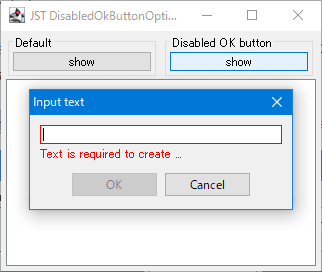
Disable the JOptionPane OK button until text is entered in the JTextField

Code

JPanel panel2 = new JPanel(new GridLayout(2, 1));
JTextField field2 = new JTextField();
Border enabledBorder = field2.getBorder();
Insets i = enabledBorder.getBorderInsets(field2);
Border disabledBorder = BorderFactory.createCompoundBorder(
    BorderFactory.createLineBorder(Color.RED),
    BorderFactory.createEmptyBorder(i.top - 1, i.left - 1, i.bottom - 1, i.right - 1));
String disabledMessage = "Text is required to create ...";
JLabel label2 = new JLabel(" ");
label2.setForeground(Color.RED);
panel2.add(field2);
panel2.add(label2);
if (field2.getText().isEmpty()) {
  field2.setBorder(disabledBorder);
  label2.setText(disabledMessage);
}
field2.addHierarchyListener(e -> {
  Component c = e.getComponent();
  if ((e.getChangeFlags() & HierarchyEvent.SHOWING_CHANGED) != 0 && c.isShowing()) {
    EventQueue.invokeLater(c::requestFocusInWindow);
  }
});
field2.getDocument().addDocumentListener(new DocumentListener() {
  private void update() {
    boolean verified = !field2.getText().isEmpty();
    JButton b = field2.getRootPane().getDefaultButton();
    if (verified) {
      b.setEnabled(true);
      field2.setBorder(enabledBorder);
      label2.setText(" ");
    } else {
      b.setEnabled(false);
      field2.setBorder(disabledBorder);
      label2.setText(disabledMessage);
    }
  }

  @Override public void insertUpdate(DocumentEvent e) {
    update();
  }

  @Override public void removeUpdate(DocumentEvent e) {
    update();
  }

  @Override public void changedUpdate(DocumentEvent e) {
    update();
  }
});
JButton button2 = new JButton("show");
button2.addActionListener(e -> {
  Component p2 = log.getRootPane();
  EventQueue.invokeLater(() -> {
    JButton b = field2.getRootPane().getDefaultButton();
    if (b != null && field2.getText().isEmpty()) {
      b.setEnabled(false);
    }
  });
  int ret = JOptionPane.showConfirmDialog(
      p2, panel2, "Input text", JOptionPane.OK_CANCEL_OPTION, JOptionPane.PLAIN_MESSAGE);
  if (ret == JOptionPane.OK_OPTION) {
    log.setText(field2.getText());
  }
});

References

2020/03/31

Rotate the tab title of JTabbedPane vertically by 90 degrees

Code

private Icon makeVerticalTabIcon(String title, Icon icon, boolean clockwise) {
  JLabel label = new JLabel(title, icon, SwingConstants.LEADING);
  label.setBorder(BorderFactory.createEmptyBorder(0, 2, 0, 2));
  Dimension d = label.getPreferredSize();
  int w = d.height;
  int h = d.width;
  BufferedImage bi = new BufferedImage(w, h, BufferedImage.TYPE_INT_ARGB);
  Graphics2D g2 = (Graphics2D) bi.getGraphics();
  AffineTransform at = clockwise
      ? AffineTransform.getTranslateInstance(w, 0)
      : AffineTransform.getTranslateInstance(0, h);
  at.quadrantRotate(clockwise ? 1 : -1);
  g2.setTransform(at);
  SwingUtilities.paintComponent(g2, label, this, 0, 0, d.width, d.height);
  g2.dispose();
  return new ImageIcon(bi);
}

References

2020/02/29

Display the Unicode code point of the character at the Caret position in the JTextArea

Code

String u1F60x = "😀😁😂😃😄😅😆😇😈😉😊😋😌😍😎😏";
String u1F61x = "😐😑😒😓😔😕😖😗😘😙😚😛😜😝😞😟";
String u1F62x = "😠😡😢😣😤😥😦😧😨😩😪😫😬😭😮😯";
String u1F63x = "😰😱😲😳😴😵😶😷😸😹😺😻😼😽😾😿";
String u1F64x = "🙀🙁🙂  🙅🙆🙇🙈🙉🙊🙋🙌🙍🙎🙏";

JTextField label = new JTextField();
label.setEditable(false);
label.setFont(label.getFont().deriveFont(32f));

List<String> l = Arrays.asList(u1F60x, u1F61x, u1F62x, u1F63x, u1F64x);
JTextArea textArea = new JTextArea(String.join("\n", l));
textArea.addCaretListener(e -> {
  try {
    int dot = e.getDot();
    int mark = e.getMark();
    if (dot - mark == 0) {
      Document doc = textArea.getDocument();
      String txt = doc.getText(dot, 1);
      int code = txt.codePointAt(0);
      if (Character.isHighSurrogate((char) code)) {
        txt = doc.getText(dot, 2);
        code = txt.codePointAt(0);
      }
      label.setText(String.format("%s: U+%04X", txt, code));
    } else {
      label.setText("");
    }
  } catch (BadLocationException ex) {
    ex.printStackTrace();
  }
});

References