Google Tag Manager

2021/01/31

Draw the upper right, left, and right borders sequentially when JTextField gets focus

Code

class AnimatedBorder extends EmptyBorder {
  private static final int BOTTOM_SPACE = 20;
  private static final double PLAY_TIME = 300d;
  private static final int BORDER = 4;
  private final Timer animator = new Timer(10, null);
  private final transient Stroke stroke = new BasicStroke(BORDER);
  private final transient Stroke bottomStroke = new BasicStroke(BORDER / 2f);
  private long startTime = -1L;
  private final transient List points = new ArrayList<>();
  private transient Shape shape;

  public AnimatedBorder(JComponent c) {
    super(BORDER, BORDER, BORDER + BOTTOM_SPACE, BORDER);
    animator.addActionListener(e -> {
      if (startTime < 0) {
        startTime = System.currentTimeMillis();
      }
      long playTime = System.currentTimeMillis() - startTime;
      double progress = playTime / PLAY_TIME;
      boolean stop = progress > 1d || points.isEmpty();
      if (stop) {
        startTime = -1L;
        ((Timer) e.getSource()).stop();
        c.repaint();
        return;
      }
      Point2D pos = new Point2D.Double();
      pos.setLocation(points.get(0));
      Path2D border = new Path2D.Double();
      border.moveTo(pos.getX(), pos.getY());
      int idx = Math.min(Math.max(0, (int) (points.size() * progress)), points.size() - 1);
      for (int i = 0; i <= idx; i++) {
        pos.setLocation(points.get(i));
        border.lineTo(pos.getX(), pos.getY());
        border.moveTo(pos.getX(), pos.getY());
      }
      border.closePath();
      shape = border;
      c.repaint();
    });
    c.addFocusListener(new FocusListener() {
      @Override public void focusGained(FocusEvent e) {
        Rectangle r = c.getBounds();
        r.height -= BOTTOM_SPACE + 1;
        Path2D p = new Path2D.Double();
        p.moveTo(r.getWidth(), r.getHeight());
        p.lineTo(r.getWidth(), 0d);
        p.lineTo(0d, 0d);
        p.lineTo(0d, r.getHeight());
        p.closePath();
        makePointList(p, points);
        animator.start();
      }

      @Override public void focusLost(FocusEvent e) {
        points.clear();
        shape = null;
        c.repaint();
      }
    });
  }

  @Override public void paintBorder(Component c, Graphics g, int x, int y, int w, int h) {
    super.paintBorder(c, g, x, y, w, h);
    Graphics2D g2 = (Graphics2D) g.create();
    g2.setPaint(c.isEnabled() ? Color.ORANGE : Color.GRAY);
    g2.translate(x, y);
    g2.setStroke(bottomStroke);
    g2.drawLine(0, h - BOTTOM_SPACE, w - 1, h - BOTTOM_SPACE);
    g2.setStroke(stroke);
    if (shape != null) {
      g2.draw(shape);
    }
    g2.dispose();
  }

  private static void makePointList(Shape shape, List points) {
    points.clear();
    PathIterator pi = shape.getPathIterator(null, .01);
    Point2D prev = new Point2D.Double();
    double delta = .02;
    double threshold = 2d;
    double[] coords = new double[6];
    while (!pi.isDone()) {
      int segment = pi.currentSegment(coords);
      Point2D current = createPoint(coords[0], coords[1]);
      if (segment == PathIterator.SEG_MOVETO) {
        points.add(current);
        prev.setLocation(current);
      } else if (segment == PathIterator.SEG_LINETO) {
        double distance = prev.distance(current);
        double fraction = delta;
        if (distance > threshold) {
          Point2D p = interpolate(prev, current, fraction);
          while (distance > prev.distance(p)) {
            points.add(p);
            fraction += delta;
            p = interpolate(prev, current, fraction);
          }
        } else {
          points.add(current);
        }
        prev.setLocation(current);
      }
      pi.next();
    }
  }

  private static Point2D createPoint(double x, double y) {
    return new Point2D.Double(x, y);
  }

  private static Point2D interpolate(Point2D start, Point2D end, double fraction) {
    double dx = end.getX() - start.getX();
    double dy = end.getY() - start.getY();
    double nx = start.getX() + dx * fraction;
    double ny = start.getY() + dy * fraction;
    return new Point2D.Double(nx, ny);
  }
}

References

2020/12/31

Use thumbnail as default Icon for JRadioButton

Code

class SelectedIcon implements Icon {
  private final Icon icon;
  private final Color color;

  protected SelectedIcon(Icon icon, Color color) {
    this.icon = icon;
    this.color = color;
  }

  @Override public void paintIcon(Component c, Graphics g, int x, int y) {
    Graphics2D g2 = (Graphics2D) g.create();
    g2.setRenderingHint(RenderingHints.KEY_ANTIALIASING, RenderingHints.VALUE_ANTIALIAS_ON);
    g2.translate(x, y);
    icon.paintIcon(c, g2, 0, 0);
    Path2D triangle = new Path2D.Double();
    triangle.moveTo(getIconWidth(), getIconHeight() / 2d);
    triangle.lineTo(getIconWidth(), getIconHeight());
    triangle.lineTo(getIconWidth() - getIconHeight() / 2d, getIconHeight());
    triangle.closePath();

    g2.setPaint(color);
    g2.fill(triangle);
    g2.setStroke(new BasicStroke(3f));
    g2.drawRect(0, 0, getIconWidth(), getIconHeight());
    g2.setPaint(Color.WHITE);
    Font f = g2.getFont();
    g2.drawString("?", getIconWidth() - f.getSize(), getIconHeight() - 3);
    g2.dispose();
  }

  @Override public int getIconWidth() {
    return icon.getIconWidth();
  }

  @Override public int getIconHeight() {
    return icon.getIconHeight();
  }
}

Explanation

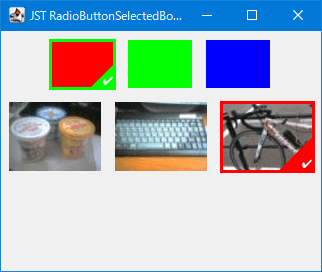
Change the default radio button of JRadioButton to an image thumbnail and the selected state button to an icon with a border drawn on the thumbnail.

References

2020/11/30

Create switchable buttons in JSlider

Use JSlider to create switch buttons that can be toggled on and off by clicking the mouse or dragging the knob

Code

UIDefaults d = new UIDefaults();
d.put("Slider.thumbHeight", 40);
d.put("Slider.thumbWidth", 40);
d.put("Slider:SliderTrack[Enabled].backgroundPainter", (Painter) (g, c, w, h) -> {
  int arc = 40;
  int fillLeft = 2;
  int fillTop = 2;
  int trackWidth = w - fillLeft - fillLeft;
  int trackHeight = h - fillTop - fillTop;
  int baseline = trackHeight - fillTop - fillTop; // c.getBaseline(w, h);
  String off = "Off";

  g.setRenderingHint(RenderingHints.KEY_ANTIALIASING, RenderingHints.VALUE_ANTIALIAS_ON);
  g.setColor(Color.GRAY);
  g.fillRoundRect(fillLeft, fillTop, trackWidth, trackHeight, arc, arc);
  g.setPaint(Color.WHITE);
  g.drawString(off, w - g.getFontMetrics().stringWidth(off) - fillLeft * 5, baseline);

  int fillRight = getXPositionForValue(c, new Rectangle(fillLeft, fillTop, trackWidth, trackHeight));
  g.setColor(Color.ORANGE);
  g.fillRoundRect(fillLeft + 1, fillTop, fillRight - fillLeft, trackHeight, arc, arc);

  g.setPaint(Color.WHITE);
  if (fillRight - fillLeft > 0) {
    g.drawString("On", fillLeft * 5, baseline);
  }
  g.setStroke(new BasicStroke(2.5f));
  g.drawRoundRect(fillLeft, fillTop, trackWidth, trackHeight, arc, arc);
});

Painter thumbPainter = (g, c, w, h) -> {
  int fillLeft = 8;
  int fillTop = 8;
  int trackWidth = w - fillLeft - fillLeft;
  int trackHeight = h - fillTop - fillTop;
  g.setPaint(Color.WHITE);
  g.fillOval(fillLeft, fillTop, trackWidth, trackHeight);
};
d.put("Slider:SliderThumb[Disabled].backgroundPainter", thumbPainter);
d.put("Slider:SliderThumb[Enabled].backgroundPainter", thumbPainter);
d.put("Slider:SliderThumb[Focused+MouseOver].backgroundPainter", thumbPainter);
d.put("Slider:SliderThumb[Focused+Pressed].backgroundPainter", thumbPainter);
d.put("Slider:SliderThumb[Focused].backgroundPainter", thumbPainter);
d.put("Slider:SliderThumb[MouseOver].backgroundPainter", thumbPainter);
d.put("Slider:SliderThumb[Pressed].backgroundPainter", thumbPainter);

JSlider slider = new JSlider(0, 1, 0) {
  @Override public Dimension getPreferredSize() {
    return new Dimension(100, 40);
  }
};
slider.setFont(slider.getFont().deriveFont(Font.BOLD, 32f));
slider.putClientProperty("Nimbus.Overrides", d);

Explanation

  • Default
    • Set JSlider to Min 0, Max 1
    • Change component size by overriding getPreferredSize()
  • Thumb size
    • Resize knobs by setting Slider.thumbWidth, Slider.thumbHeight
  • SliderTrack
    • Create a Painter to draw the track background and change the background color, border, and On/Off text
    • Pressing a track turns On/Off
    • Change the drawing of the knob by setting Painter
    • ​Add MouseMotionListener to redraw the whole thing while dragging, since some afterimages may appear when you drag the knob
    • ​Pressing or clicking the knob does not cause the `On/Off 'toggle
  • JSlider + JLayer
    • ​The drawing of the track and knob is identical to the above SliderTrack
    • ​Use JLayer to set JSlider to switch On/Off regardless of track or knob
    • ​Redraw while dragging the knob is also done in LayerUI#processMouseMotionEvent(...)
class ToggleSwitchLayerUI extends LayerUI {
  @Override public void installUI(JComponent c) {
    super.installUI(c);
    if (c instanceof JLayer) {
      ((JLayer) c).setLayerEventMask(AWTEvent.MOUSE_EVENT_MASK | AWTEvent.MOUSE_MOTION_EVENT_MASK);
    }
  }

  @Override public void uninstallUI(JComponent c) {
    if (c instanceof JLayer) {
      ((JLayer) c).setLayerEventMask(0);
    }
    super.uninstallUI(c);
  }

  @Override protected void processMouseEvent(MouseEvent e, JLayer l) {
    if (e.getID() == MouseEvent.MOUSE_PRESSED && SwingUtilities.isLeftMouseButton(e)) {
      e.getComponent().dispatchEvent(new MouseEvent(
          e.getComponent(),
          e.getID(), e.getWhen(),
          InputEvent.BUTTON3_DOWN_MASK, // e.getModifiers(),
          e.getX(), e.getY(),
          e.getXOnScreen(), e.getYOnScreen(),
          e.getClickCount(),
          e.isPopupTrigger(),
          MouseEvent.BUTTON3)); // e.getButton());
      e.consume();
    } else if (e.getID() == MouseEvent.MOUSE_CLICKED && SwingUtilities.isLeftMouseButton(e)) {
      JSlider slider = l.getView();
      int v = slider.getValue();
      if (slider.getMinimum() == v) {
        slider.setValue(slider.getMaximum());
      } else if (slider.getMaximum() == v) {
        slider.setValue(slider.getMinimum());
      }
    }
  }

  @Override protected void processMouseMotionEvent(MouseEvent e, JLayer l) {
    l.getView().repaint();
  }
}

References

2020/10/31

Show or hide each TableColumn added to the JTableHeader

Code

class TableHeaderPopupMenu extends JPopupMenu {
  protected TableHeaderPopupMenu(JTable table) {
    super();
    TableColumnModel columnModel = table.getColumnModel();
    List>TableColumn> list = Collections.list(columnModel.getColumns());
    list.forEach(tableColumn -> {
      String name = Objects.toString(tableColumn.getHeaderValue());
      // System.out.format("%s - %s%n", name, tableColumn.getIdentifier());
      JCheckBoxMenuItem item = new JCheckBoxMenuItem(name, true);
      item.addItemListener(e -> {
        if (((AbstractButton) e.getItemSelectable()).isSelected()) {
          columnModel.addColumn(tableColumn);
        } else {
          columnModel.removeColumn(tableColumn);
        }
        updateMenuItems(columnModel);
      });
      add(item);
    });
  }

  @Override public void show(Component c, int x, int y) {
    if (c instanceof JTableHeader) {
      JTableHeader header = (JTableHeader) c;
      JTable table = header.getTable();
      header.setDraggedColumn(null);
      header.repaint();
      table.repaint();
      updateMenuItems(header.getColumnModel());
      super.show(c, x, y);
    }
  }

  private void updateMenuItems(TableColumnModel columnModel) {
    boolean isOnlyOneMenu = columnModel.getColumnCount() == 1;
    if (isOnlyOneMenu) {
      stream(this).map(MenuElement::getComponent).forEach(mi ->
          mi.setEnabled(!(mi instanceof AbstractButton)
                        || !((AbstractButton) mi).isSelected()));
    } else {
      stream(this).forEach(me -> me.getComponent().setEnabled(true));
    }
  }

  private static Stream>MenuElement> stream(MenuElement me) {
    return Stream.of(me.getSubElements())
      .flatMap(m -> Stream.concat(Stream.of(m), stream(m)));
  }
}

Explanation

  • Initially shows all TableColumns generated from a TableModel
    • All JCheckBoxMenuItems are also selected
  • TableColumn hidden with TableColumnModel#removeColumn(TableColumn) method when deselected with JCheckBoxMenuItem
    • The column is removed from TableColumnModel and hidden from JTableHeader, but the column remains in TableModel
    • Check the number of TableColumn columns to enable/disable the JCheckBoxMenuItem, e.g. when opening a JPopupMenu, so that all TableColumns are not hidden
  • Show TableColumn with TableColumnModel#addColumn(TableColumn) method when selected and set with JCheckBoxMenuItem
    • Columns are added to TableColumnModel and appear in JTableHeader, but TableModel is unchanged from its initial state

  • UIManager.put("CheckBoxMenuItem.doNotCloseOnMouseClick", true) in Java 9 or higher; If set to and the currently selected TableColumn is hidden with JCheckBoxMenuItem while JPopupMenu is open, an ArrayIndexOutOfBoundsException will occur
    • Add PopupMenuListener to JPopupMenu or override the JPopupMenu#show(...) method to JTableHeader.setDraggedColumn(null) can be avoided by clearing the selection state in the scene view

References

2020/09/30

Creating StatusBar with size grips to resize the JFrame

Code

class ResizeWindowListener extends MouseInputAdapter {
  private final Rectangle rect = new Rectangle();
  private final Point startPt = new Point();

  @Override public void mousePressed(MouseEvent e) {
    Component p = SwingUtilities.getRoot(e.getComponent());
    if (p instanceof Window) {
      startPt.setLocation(e.getPoint());
      rect.setBounds(p.getBounds());
    }
  }

  @Override public void mouseDragged(MouseEvent e) {
    Component p = SwingUtilities.getRoot(e.getComponent());
    if (!rect.isEmpty() && p instanceof Window) {
      Point pt = e.getPoint();
      rect.width += pt.x - startPt.x;
      rect.height += pt.y - startPt.y;
      p.setBounds(rect);
    }
  }
}

// Size Grip
// Create a GripIcon with a JLabel and position it at the right end(BorderLayout.EAST) of the StatusBar
class BottomRightCornerLabel extends JLabel {
  private transient MouseInputListener handler;

  protected BottomRightCornerLabel() {
    super(new BottomRightCornerIcon());
  }

  @Override public void updateUI() {
    removeMouseListener(handler);
    removeMouseMotionListener(handler);
    super.updateUI();
    handler = new ResizeWindowListener();
    addMouseListener(handler);
    addMouseMotionListener(handler);
    setCursor(Cursor.getPredefinedCursor(Cursor.SE_RESIZE_CURSOR));
  }
}

// Grip Icon
// Draw six rectangles to create a Windows 10 like icon
class BottomRightCornerIcon implements Icon {
  private static final Color SQUARE_COLOR = new Color(160, 160, 160, 160);

  @Override public void paintIcon(Component c, Graphics g, int x, int y) {
    int diff = 3;
    Graphics2D g2 = (Graphics2D) g.create();
    g2.translate(getIconWidth() - diff * 3 - 1, getIconHeight() - diff * 3 - 1);

    int firstRow = 0;
    int secondRow = firstRow + diff;
    int thirdRow = secondRow + diff;

    int firstColumn = 0;
    drawSquare(g2, firstColumn, thirdRow);

    int secondColumn = firstColumn + diff;
    drawSquare(g2, secondColumn, secondRow);
    drawSquare(g2, secondColumn, thirdRow);

    int thirdColumn = secondColumn + diff;
    drawSquare(g2, thirdColumn, firstRow);
    drawSquare(g2, thirdColumn, secondRow);
    drawSquare(g2, thirdColumn, thirdRow);

    g2.dispose();
  }

  @Override public int getIconWidth() {
    return 16;
  }

  @Override public int getIconHeight() {
    return 20;
  }

  private void drawSquare(Graphics g, int x, int y) {
    g.setColor(SQUARE_COLOR);
    g.fillRect(x, y, 2, 2);
  }
}

References